Understanding the Activity Log
Popup → Activity log narrates every record, one line at a time, in plain English. This is the full list of what it can say and exactly what each one means.
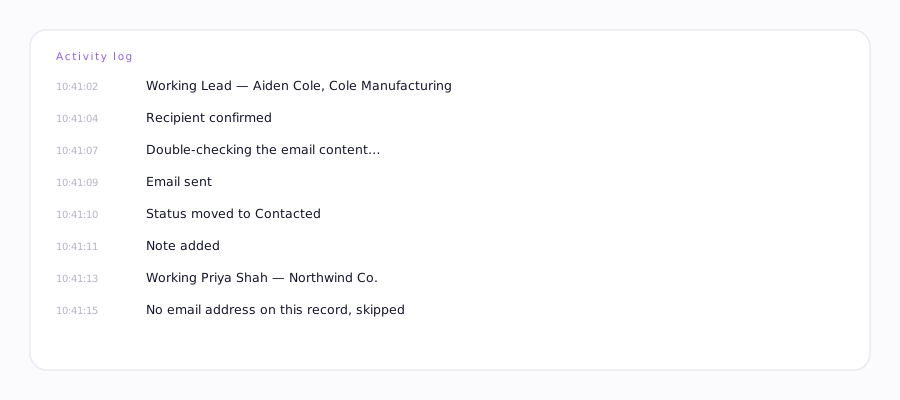
| Log line | What it means |
|---|---|
| Working Lead / Contact / Account / Opp | Started this record. |
| Double-checking the email content… | Verifying the draft before it sends. |
| Recipient confirmed | The To field is correctly filled and matches this record. |
| Waiting for the recipient to fill in | The To field hasn't populated yet — Ervona is giving the CRM a moment. |
| Email sent / Text sent | Confirmed send. |
| Salesforce didn't confirm the send, saved to retry | No send-confirmation banner appeared in time. Treated as possibly-sent, so it won't be repeated — it's queued to verify, not to resend. |
| Note added | An activity note was logged on the CRM record. |
| Saved to retry the rest later | Part of this record completed, part didn't — it's queued to finish the remaining steps only. |
| Emailed / Texted / Note already added / Status already moved earlier — skipping | That specific step already finished on an earlier pass. It's not repeated. |
| No first name on the record, greeting "there" | Sent normally, just without a personalized greeting. |
| No email address on this record, skipped | No usable email found — nothing sent for this one. |
| Couldn't find your Email button. Re-map for this record type. | This object type isn't mapped yet. Map it → |
| The next record didn't load, stopping here | The following record never became ready in time. |
| Couldn't open the next record. A split view list works best. | List-advance navigation failed — switch to a split-view list. |
| Reached the top/end of the list | Nothing left to work — it finished the visible list. |
What "self-repair" means
Occasionally the log shows a line like: "Self-repair (page changed): removed 1 broken mapped pointer — Email button. Auto-detect takes over." Your CRM's page layout shifted enough that a saved mapping stopped matching reality, so Ervona removed just that one broken piece and fell back to detecting it fresh, rather than failing the whole record. Undo is available right in the popup if it guessed wrong.
Copy the log, don't paraphrase it. If you're emailing support, paste the actual lines — the exact wording tells us exactly which code path ran, which is faster than a description of what you saw.