Why did my run stop?
A batch stopping isn't random. It's always one of a short list of reasons, and Ervona tells you which one in the popup and the activity log. Here's every one of them, and what to do about each.
Signed out, or asked to sign in again
- "You're not signed in on this computer." Sign back in. Your setup (mapping, templates, history) follows your account, not this browser, so nothing is lost.
- A code/verification prompt appears mid-run. Your account has two-factor sign-in and this session hasn't confirmed it yet. Enter the code once — it won't ask again for this device.
- Signed out with no warning. Either you (or someone with your login) signed out from another device, or the session genuinely expired. Sign in again; the run itself is safely paused, not lost — see "Resuming without duplicate sends" below.
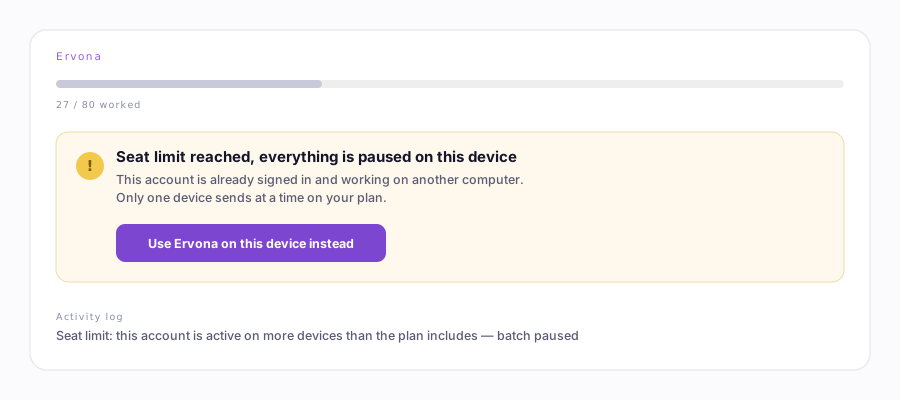
"Seat limit reached, everything is paused on this device"
Your plan includes a certain number of seats (devices signed in and working at once — one on Free/Solo/Growth, three on Scale, more on Enterprise). This message means your account is already active on another computer. Ervona checks this every few records during a run, not just at the start, so it can catch a seat conflict that starts while you're mid-batch.
Open the popup and click Use Ervona on this device instead to take the seat back. The other device's run pauses in turn, on the same check — nothing sends from both places at once.
Daily limit reached
Your plan's daily send cap (50/day free, up through unlimited) is a hard stop, shown as "Daily email limit reached — upgrade for more". It resets at a fixed time each day, not a rolling 24 hours from your first send. If instead you see "Cannot reach the email counter — holding the batch, it resumes on its own," that's not the limit — it's a connectivity hiccup, and the batch keeps retrying by itself every 30 seconds. Nothing to do but wait.
Chrome window backgrounded or hidden
This one usually doesn't stop the run — it's worth knowing what does and doesn't. Switching tabs or minimizing the window is fine; the popup badge says "In CRM · background tab" and the batch keeps going. If Chrome itself loses OS focus (another app is frontmost) for a long stretch, records can start failing simply because the browser is starved of resources. Ervona knows the difference: those failures don't count against the record, and after enough of them in a row it slows down and retries rather than stopping — "Records keep failing while Chrome is in the background — slowing down and retrying. Nothing has stopped." Only a failure that happens with Chrome actually in the foreground can end a run.
CRM navigation or layout failures
- "This record took too long and was set aside — moving on to the next one." One slow record, no bigger issue. It's queued for retry.
- "Stopped: two records in a row failed even after self-repair — running a diagnosis for you." Two real, foreground failures back to back. Ervona already tried fixing its own mapping first; if it still can't proceed it stops rather than guess, and opens a diagnosis.
- "Couldn't open the next record. A split view list works best." The list-advance step (the automatic "go to the next row") didn't find a next record. Switch to a split-view list — it's the most reliable of the three.
- "Found no record links to work — the table/kanban layout may differ." Your CRM's list layout doesn't match what Ervona expects. See Troubleshooting →
Extension not connected to the tab
"Ervona isn't connected to this CRM tab yet." A stale content script — the tab was open before Ervona last updated. Reload the CRM tab (not the extension). More on this →
Resuming never double-sends. Ervona checks three separate places before every send — your own history, a field on the CRM record, and a server-side record shared across every device on your account — so pressing Start again after any stop, on any device, skips anything already sent rather than repeating it.