Nothing sent — what should I check?
A batch that runs to completion but sends zero emails feels broken. It almost never is — Ervona skips a record on purpose more often than it fails on one. The activity log always says which of these it was, one line per record.
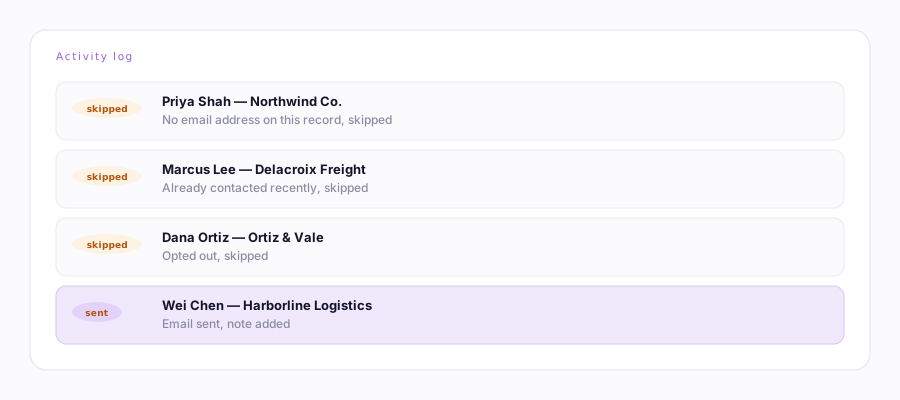
Read the activity log first
Popup → Activity log. Every record gets one line. If they all say some version of "skipped," the reason is right there in plain English — you don't need this whole list, just match the wording. Full message catalog →
| The log says… | What it means | What to do |
|---|---|---|
| No email address on this record, skipped | The record has no email field filled in Ervona can find. | Add the email in your CRM, or check your field mapping if it's there but Ervona missed it. |
| dup-skip / recent-skip (shown as an earlier-pitch skip) | Duplicate protection: this person was already contacted recently, by you or anyone else on the account. | Working as intended. Lower skipDays in Engine rules if 14 days is too long for your use case. |
| optout-skip / bounce-skip | They unsubscribed, or a prior email to them bounced. | Leave them alone — this is CAN-SPAM and deliverability protection, not a bug. |
| Daily email limit reached | Your plan's daily cap is spent for the day. | Upgrade, or wait for the daily reset. |
| Couldn't find your Email button. Re-map for this record type. | Ervona doesn't know where to click on this specific object type (e.g. you mapped Leads but this is a Contact). | Run Map My CRM again on one record of that type. |
| Found no record links to work — the layout may differ | Your list view (table/kanban) isn't one Ervona recognizes. | Switch to a split-view list, or open one record and use Send One. |
| No first name, greeting "there" | Not a skip — it sent, just with a generic greeting. | Nothing to fix unless you want the field filled in your CRM. |
If every record shows "sent" but you never received one
You're checking the wrong inbox — sends go through the record's actual email field, not your own. Open one sent record in your CRM and confirm the email address on it is one you can check, or ask the recipient directly.
If it's not in the table above
Run Diagnose this page from the popup on one of the affected records. It opens a real test composer and checks the recipient, subject, and body individually — the fastest way to describe what's happening to support, since you can copy the report straight into an email.