Connect HubSpot to your desk
HubSpot connects with one token from a private app you create in about two minutes. It works on every HubSpot plan including free, and is stored write-only: once saved, nothing in the browser can read it back. It is not read-only on the HubSpot side — the desk logs its touches back onto the record (see "See the desk's work" below), so it needs a handful of write scopes as well as read ones.
Create the private app and copy its token
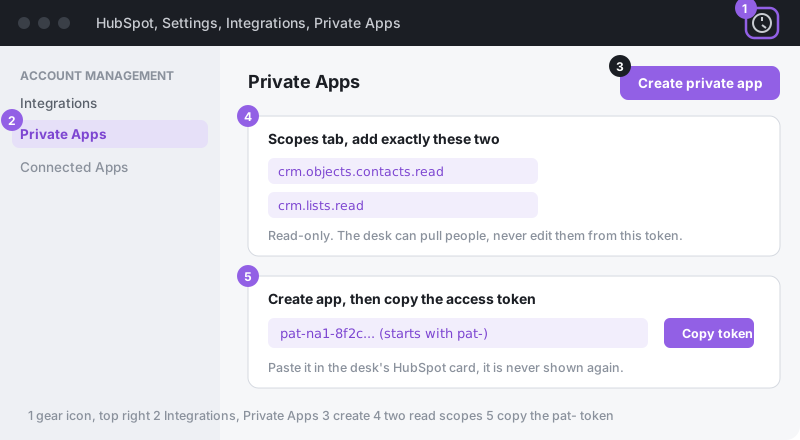
- In HubSpot, click the gear icon (top right) to open Settings.
- In the left menu: Integrations → Private Apps → press the create button. On the newest HubSpot (late 2025 on) the menu item is called Legacy apps instead, press Create legacy app and pick Private, the screens after that are the same. Name it, say, Ervona Desk.
- Open the Scopes tab and add all seven below. Skipping one does not break the connection itself — it breaks whichever feature needed it, quietly, later.
Scope What it's for crm.objects.contacts.readPull people into a campaign. crm.objects.contacts.writeLog touches and replies as notes, set lead status and owner on handoff, create contacts on import. Without this, writeback fails silently and nothing lands on the record. crm.schemas.contacts.readRead your contact property list, so Prospecting's filter builder shows your real fields instead of a generic default set. crm.schemas.companies.readSame, for company properties. crm.objects.deals.readAttach a reply to the deal a rep is already working, and report the pipeline dollar value the desk sourced, not just meeting counts. crm.objects.owners.readMatch a rep's email to their HubSpot user, so handoffs assign the record to the right owner. crm.lists.readSee your saved lists to build a campaign from one. One more, optional:
oauthlets the desk link straight to the record in your reports. Skip it and the reports still work, just without the clickable link. - Press Create app, confirm, and copy the access token (it starts with
pat-). HubSpot shows it in full only here. - In Desk, under Mailboxes & texting → Connect HubSpot, paste the token and press Connect.
On an older HubSpot account?
- If your Settings menu says "Account Setup": same place, older labels. Gear icon → Account Setup → Integrations → Private Apps.
- If you found a page called "API key": that is HubSpot's old system, retired in 2022. Those keys no longer work anywhere, including here. Create a private app as above, it replaced the API key one for one.
- If Private Apps (or Legacy apps) is missing entirely: only a super admin can create these, and there is no permission that grants it to anyone else. Ask a super admin to create the app and hand you the token.
If Connect says no
- Token rejected outright: it was copied incompletely. Open the app's Auth tab and copy it again.
- "Could not read properties" or a 403 on one feature only: the connection itself is fine, one scope from the table above is missing. The error names the exact scope it needed — add that one under the app's Scopes tab, no need to touch the token or reconnect.
- It worked, then stopped: someone rotated the token in HubSpot (your app → Auth → Rotate). "Rotate and expire now" kills the old token on the spot; "Rotate and expire later" gives it seven more days. Either way, paste the new one in Desk.
- Lists do not show up: only saved lists appear, and only ones the desk can read with
crm.lists.read. Active and static lists both work. - Notes, status, or owner are not landing on the record: the app is missing
crm.objects.contacts.write. This one is easy to skip since the connection still tests fine without it — reads work, only the writeback silently drops.
See the desk's work in your own HubSpot reports
Every touch and every reply is already logged on the record as a note, and the desk sets the lead status and the owner when it hands someone over. That covers the activity timeline, but it does not put the desk into the reports and dashboards you already run.
If you want that, create these contact properties. Create the ones you want and skip the rest. Nothing breaks if you create none of them, and nothing needs to be switched on afterwards. The desk checks which of them exist and fills in the ones it finds.
| Field name (API name) | Type | What lands in it |
|---|---|---|
ervona_status | Text | Where the lead got to: Warm - replied when the desk got a real reply worth a person's time, or Needs a human when it handed over for another reason. |
ervona_last_touch | Date picker | When the desk last did something with this record. Useful for "no Ervona activity in 30 days" style reports. |
ervona_assigned_to | Text | The email address of the rep the lead was handed to. |
The names have to match exactly, including the lower case and the underscores, which is how HubSpot names an internal property. Once they exist you can group, filter and chart on them like any other field, and build a workflow that fires the moment the desk marks somebody warm.
A field the desk cannot write to is skipped, not retried, and the rest of the write still lands. So a formula field or one the connected user cannot edit costs you that column and nothing else.